Retrieving Your Blue Federal Credit Union IRS eTax Form(s)
Your Blue Federal Credit Union IRS eTax form(s) is now available. Follow these instructions to access your tax form(s).
Your Blue Federal Credit Union IRS eTax form(s) is now available for those whose accounts qualify.
Tax forms are available online in Blue Digital. To access your eTax form(s), you’ll need to complete the following steps.
Instructions for receiving your tax form:
1:
In order to view your tax form, you must log in to Blue Digital.
Blue Digital Mobile Instructions:
2:
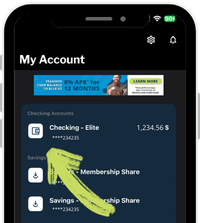
After logging into Blue Digital Mobile, go to the Self-Service tab and tap on the account you want to retrieve your statement for.
3:
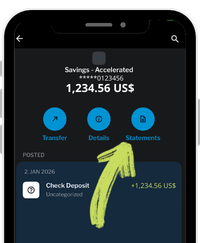
Once you have opened the account, tap ‘Statements‘. If you have not signed up for e-statements, you will have to enter your email address and tap ‘accept’.
After you have clicked statements a browser pop-up will appear with a message that says, “Please wait while we retrieve your statement data.”
4:
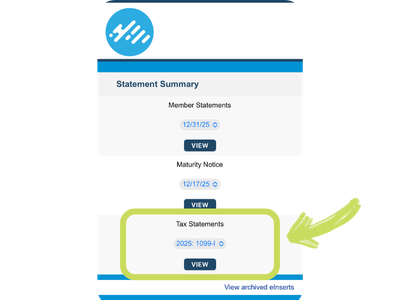
Please be patient as it will take a moment to load. Now you can select which tax statement you’d like to open, and tap ‘VIEW‘ to open the statement. Upon opening the statement you can download and share it.
Blue Digital Desktop Instructions:
2:
After logging into Blue Digital Desktop, go to the Self-Service tab and select ‘Statements‘

3:
After selecting ‘Statements’ select the account you want to get your tax form for.
Please wait patiently as it might take a moment to load.

4:
After loading you should be able to see your tax form and click ‘VIEW‘ to open the statement. Not all accounts have a tax form.
