A Simpler Way to Pay Vendors: Using ACH Through Blue Business Banking

For many small business owners, paying vendors is one of those essential tasks that can quickly become time-consuming. Between tracking invoices, confirming vendor information, preparing checks, and updating accounting software, even routine payments can pull attention away from running the business.
Blue Business Banking, powered by Lumin, gives eligible business members a more efficient way to manage vendor payments. Through the platform, businesses can create and send ACH transfers, manage payment recipients, establish approval controls, and track activity from one convenient place.
What Is an ACH Transfer?
An Automated Clearing House, or ACH, transfer is an electronic payment sent between financial institutions through the ACH Network.
ACH transfers are commonly used for:
- Vendor and supplier payments
- Business-to-business, or B2B, payments
- Employee payroll and direct deposits
- Payments to contractors and freelancers
- Recurring bills
- Transfers between eligible business checking accounts
An ACH credit sends money from your business checking account to another bank account. For example, when your business pays a vendor or freelancer, it may initiate an ACH credit.
An ACH debit pulls authorized funds from an account. ACH debits are commonly used for recurring bills, subscriptions, loan payments, and other authorized withdrawals.
The ACH Network is governed by Nacha, which establishes operating rules for participating financial institutions and organizations. Depending on timing, eligibility, platform limits, and processing cutoffs, ACH credits and ACH debits may settle the same day or within a future processing window. Same Day ACH allows eligible payments to move through the network within the same business day.
Why Use ACH to Pay Vendors?
Save Time on Routine Payments
Once a vendor is established as a recipient, you can create a reusable ACH transfer template instead of entering the same payment details each time.
This can be especially helpful when paying:
- A monthly utility provider
- A recurring supplier
- A commercial landlord
- An independent contractor
- A consultant or freelancer
- A regular service provider
After a template is created, the payment amount can be adjusted as needed before the ACH transfer is reviewed and submitted. Blue Business Banking also allows authorized users to view scheduled ACH transfers, payment history, recipients, limits, and cutoff times.
Support Potential Cost Savings
ACH payments may provide cost savings compared with processes that rely heavily on paper checks, postage, manual handling, or expedited payment methods.
The actual cost will depend on your Blue Business Banking package, transaction volume, and the type of payment you select. Blue’s Advantage and Executive packages currently include access to the ACH and payroll module, with a set number of included ACH transactions each month.
Keep Business Payments Organized
Managing payments through the same platform as your business checking account can make it easier to review balances, transaction history, pending payments, and approval activity.
Blue Business Banking also integrates with accounting software such as QuickBooks, which can help reduce duplicate data entry and support more organized financial records.
This can complement tools such as:
- QuickBooks
- QuickBooks Bill Pay
- Other accounting software
- Invoice tracking systems
- Internal accounts-payable processes
Features and capabilities can vary between Blue Business Banking, QuickBooks Bill Pay, and other third-party services, so review each platform before deciding where a payment should be created and tracked.
Add More Control to the Payment Process
Business owners can create sub-users, assign role-based access, establish transaction limits, and control which users can initiate or approve certain payments.
After an ACH payment is scheduled in Blue Business Banking, it moves to the Approvals section. A user with the appropriate permissions must approve the ACH transfer before it can move forward.
This separation can help businesses create a consistent process for reviewing vendor payments.
ACH Transfer, Bill Pay or Wire Transfer?
ACH transfers are one of several ways to move money through Blue Business Banking. The right option often depends on the recipient, payment amount, timing, urgency, and available vendor information.
ACH Transfers
An ACH transfer may be a good fit for routine or recurring domestic payments when the vendor has provided its bank routing number and bank account number.
ACH is commonly used for:
- Recurring vendor payments
- B2B payments
- Direct deposit and payroll
- Contractor and freelancer payments
- High-volume payment files
- Scheduled payments
Blue Business Banking can handle ACH credits and ACH debits and can generate Nacha-compliant files.
Business Bill Pay
Business Bill Pay, sometimes written as billpay, allows businesses to pay bills directly from an eligible account. The service connects electronically with many billers and may be useful when you do not have the recipient’s banking information or prefer to manage the payment by biller.
Bill Pay may work well for:
- Utilities
- Insurance premiums
- Recurring business bills
- Service providers
- Vendors that accept payments through an established biller network
Wire Transfers
A wire transfer is often used when funds need to be sent more urgently or when a vendor specifically requests payment by wire.
Blue Business Banking supports domestic wire transfers for eligible users and allows businesses to establish wire transfer limits and approval thresholds. Access to initiating wires through Blue Business Banking is currently included with the Executive package, while other package levels may require in-branch service.
Because a wire transfer is generally difficult to reverse, always verify the instructions directly with the recipient before sending funds.
Payment Links
Payment links are typically used to collect money from customers rather than to send ACH payments to vendors. For example, a business may include a secure payment link on an invoice so a customer can submit payment electronically.
Although payment links can support incoming cash flow, they serve a different purpose from ACH transfers, Bill Pay, and wire transfers used to pay business expenses.
How to Send an ACH Payment to a Vendor
ACH services through Blue Business Banking are currently available with the Advantage and Executive packages.
1. Select Manage ACH
Log in to Blue Business Banking and select Manage ACH from the navigation menu. Review and accept the applicable disclosure.
2. Create an ACH Template
Select Create a New Template and complete the required fields.
Choose the transaction type that best matches the payment. For example, a business payment to a utility provider or vendor may use the Credit Businesses transaction type.
Use a recognizable template name, such as:
- Monthly Office Rent
- ABC Supply Company
- Contract Designer
- Building Maintenance
- Weekly Freelancer Payment
3. Add the Vendor as a Recipient
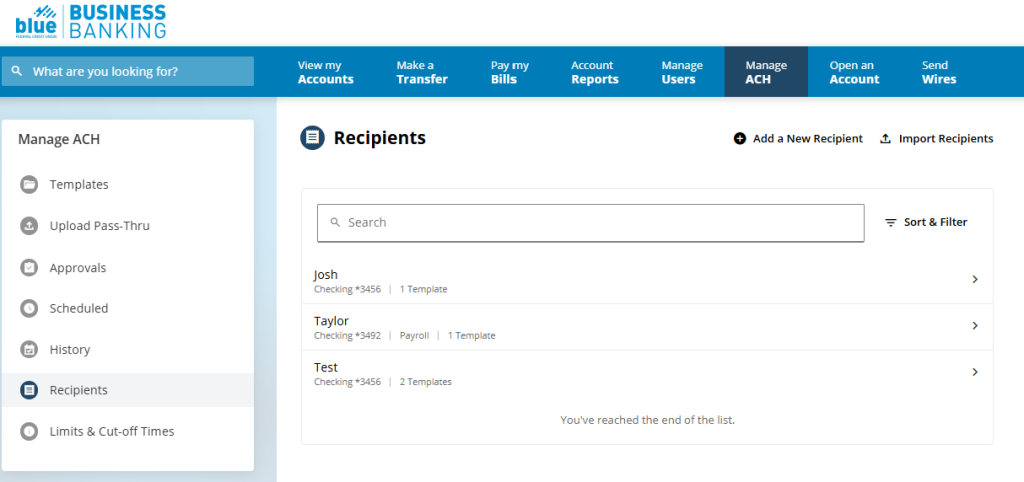
Before scheduling an ACH transfer, add the vendor as a recipient.
Depending on the required fields, you may need information such as:
- Vendor or business name
- Bank account number
- Bank routing number
- Account type
- Payment description
- Other required vendor information
Carefully review the bank account number and bank routing number before saving the recipient.
4. Attach the Recipient to the Template
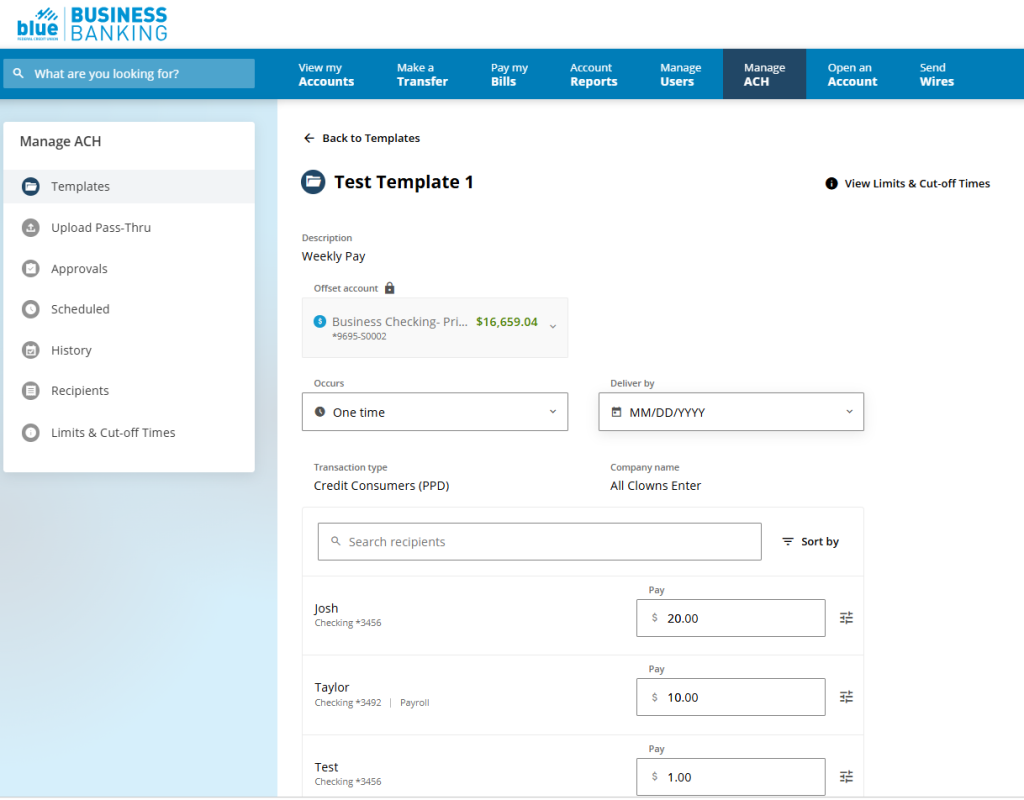
Return to the ACH template, select Add or Edit Recipients, choose the appropriate vendor, and save the selection.
5. Schedule the ACH Transfer

Select Schedule, enter the payment amount, and choose the processing date.
Review:
- Recipient name
- Vendor information
- Bank account number
- Bank routing number
- Funding account
- Payment amount
- Processing date
Then submit the transfer for approval.
6. Approve the Payment
The payment will move to the Approvals section. An authorized user must review and approve it before processing. Businesses should also review the platform’s ACH limits and cutoff times to confirm that the transfer is scheduled as intended.
Can You Use Same Day ACH?
Same Day ACH may be available for eligible ACH transfers that meet applicable network rules, dollar limits, platform requirements, and submission deadlines.
Nacha currently permits eligible same-day ACH payments of up to $1 million, although the limit is scheduled to increase to $10 million on September 17, 2027. Blue’s own transaction limits and service availability may be lower, so always review the limits and cutoff times displayed within Blue Business Banking.
When scheduling a vendor payment, do not assume that selecting the current date automatically guarantees same-day processing. Check the available processing options and deadlines before submitting the payment.
Protect Your Business Before Sending ACH Payments
Payment fraud can begin with an email that appears to come from a familiar vendor, contractor, or freelancer asking you to update their banking information.
Before creating a new recipient or changing an existing bank account number or bank routing number, confirm the request directly with the vendor using a phone number or communication method you already know and trust.
Additional safeguards include:
- Using multi-factor authentication
- Limiting ACH and wire transfer access
- Assigning role-based user permissions
- Separating payment initiation and approval
- Setting transaction limits
- Reviewing account alerts
- Monitoring payment and recipient history
- Confirming changes to vendor information verbally
Blue Business Banking provides multi-layered authentication, transaction monitoring, user permissions, ACH notifications, and customizable alerts to help businesses manage account activity.
Avoiding Delays and Returned Payments
An ACH transfer may be delayed or returned when:
- The bank account number is incorrect
- The bank routing number is incorrect
- The recipient account is closed
- The payment exceeds an established limit
- The payment misses a processing cutoff
- An ACH debit encounters insufficient funds
- The transaction has not received the required approval
Before scheduling a payment, confirm that the funding account has enough available money to cover the transfer. Insufficient funds could cause an ACH debit or other payment to be returned and may lead to fees, vendor delays, or disruptions to service.
Manage Payments Online or Through the Mobile App
Blue Business Banking provides online and mobile access, allowing business members to manage accounts and supported services from more than one device. The mobile app can help owners and authorized users review account activity while away from the office.
Some advanced payment setup or administrative functions may be easier to complete through the full online experience. Review the available options in the mobile app before relying on it for a time-sensitive ACH transfer or wire transfer.
Give Your Business Payments a Better Process
Small business owners have many ways to move money, including ACH transfers, Bill Pay, QuickBooks Bill Pay, wire transfers, direct deposits, payment links, and other accounting software tools.
The goal is not to use every option. It is to create a payment process that is secure, repeatable, and appropriate for each transaction.
With reusable ACH templates, recipient management, approval controls, Nacha-compliant file capabilities, accounting software integration, account alerts, Bill Pay, and wire transfer options, Blue Business Banking can help simplify how your business manages outgoing payments.
Log in to Blue Business Banking to explore available ACH services, or connect with Blue’s Business Banking team for help choosing the package and payment tools that fit your business.
For You. For Life. Blue Federal Credit Union.