MOVE YOUR MONEY
Add Money
Whether you’re funding a new adventure, paying yourself back, or building toward your next goal, Blue makes it easy to move money where you need it. Discover worry-free ways to add money to your Blue accounts.
Members of our NOVA Perks™ program get access to our Anywhere Banking Tools enable them to access to, Bill Pay, eStatement, and more.

Need money available quickly?
Choose from several secure ways to add money to your Blue accounts.

Mobile deposit
Skip the branch line. Deposit checks anytime from your phone on Blue Digital (Online Banking). You can make a deposit to all your regular accounts including savings and checking.
External transfer
Move money between your Blue accounts and accounts you have at other financial institutions through online banking.
Direct Deposit
Get paid directly into your Blue account automatically and securely. Set up direct deposit for paychecks, government benefits, and more.
Find an ATM
Use one of our thousands of surcharge-free CO-OP ATMs to deposit cash or checks into your Blue accounts conveniently while you’re on the go.
Visit In-Branch
Prefer in-person support? Stop by a Blue branch to deposit checks or cash and get help from our team along the way.
Find Your Account and Routing Numbers:
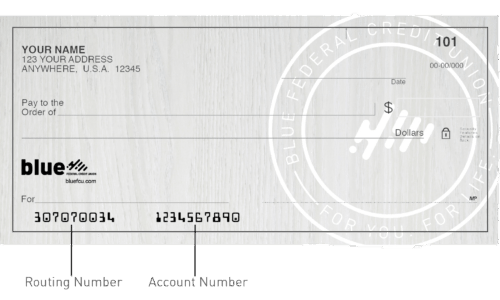
You’ll need your routing and account numbers to set up direct deposit, transfers, and other payment services.
Routing Number: 307070034
Online Banking:
Sign in to Blue Digital Banking to locate your account number within your account details or eStatements. Once logged in, you select the ‘Services’ tab, then ‘View Statements and Tax Info’. Your account number will be shown in the blue box titled ‘For account #0000xxxxxx’.
On a Check:
Your routing and account numbers can also be found at the bottom of your Blue checks.
SEND MONEY WITH ZELLE®
Send and receive money with friends, family, and people you trust directly from your Blue account.
