Blue Digital Updates
Notable New Feature Updates
Blue is continually working on improving our online and mobile banking platform, Blue Digital.
We have notable updates listed below.
Q4 2025 Updates
Blue Digital Mobile Apps Update (v2025.9)
New digital updates—designed to make everyday banking easier
We’ve rolled out a new set of digital updates—all with one goal in mind: making it easier to manage your money with confidence.
From smoother navigation to clearer credit card details, these improvements are designed to reduce friction and help you get where you need to go faster.
Here’s a quick look at what’s new:
Smarter navigation, less hassle
- Messages in the app are now clearer—and once you dismiss one, it won’t keep popping back up
- A refreshed pre-login banner shares important notices before you sign in
- Improved menus and navigation make it easier to find what you’re looking for
View Screenshots
Clearer credit cards, payments, and transfers
- Credit card screens now show amount owed for better clarity
- Rewards points are easier to view (where applicable)
- Quick Transfer now automatically fills in minimum payments on loans and credit cards
- Scheduled transfers clearly show when your payment will be sent
Easier setup and fewer frustrations
- Improved online banking registration instructions
- Fixes that prevent double submissions and layout issues
- Better reliability across devices and browsers
New offers and feedback—right when it matters
- Targeted, in-app offers you can claim, dismiss, or explore on your own time
- New tools that allow us to share promotions and gather feedback without app updates
Ongoing reliability you can count on
- Clearer maintenance messages when systems are temporarily unavailable
- Continued behind-the-scenes performance improvements
These updates are part of our ongoing commitment to making digital banking feel more intuitive, transparent, and supportive—so you can focus on what matters most. If you have questions or feedback, we’re always here to help.
Update your app to version 2025.9 now to enjoy these new features and improvements.
September 2025 Updates
Blue Digital Mobile Apps Update (v2025.7)
We’re excited to announce the latest version of our Blue Digital Mobile Apps, packed with new features, performance improvements, and bug fixes.
What’s New
- Upcoming Payments Widget: A new widget displays above your accounts, reminding you of payments due within the next 7 days. The widget changes color based on the payment status: grey (upcoming), blue (due date), and red (late).
- Principal-only Payments: You can now make principal-only payments on mobile devices, a feature previously available on our web platform.
- More Apps by Blue: We’ve added convenient links to our other apps, including Business Banking, Nova Perks, and BlueCC, in the More Menu for quick access.
Behind-the-Scenes Improvements
- A new Scheduled Maintenance Screen informs users of ongoing maintenance and prevents sign-in during this time, ensuring a better digital experience.
- Performance improvements and bug fixes for a smoother experience.
Update your app to version 2025.7 now to enjoy these new features and improvements.
August 2025 Updates
Blue Digital Update (v2025.06 – iOS, Android, and Web)
We’ve made a series of updates across both Android and iOS to keep your experience smooth, intuitive, and up to date.
Screen Refreshes
Out with the old, in with the clear. We’ve updated older screens with fresh images and simplified messaging, making everything easier to read and navigate.
Credit Card Enhancements
Minimum Payment information is now right at the top of your account header for quick reference.
The new “Pay” action replaces “Transfer,” taking you directly to the payment screen with your card pre-filled and quick payment options ready to go.
Credit Card Statements now route through our new PSCU integration for full access (when enabled).
Account Updates & Messaging
Smarter error messages when renaming accounts:
Header: Failed to rename account
Body: Special characters not allowed.
Loan account headers now show:
Available Balance for Lines of Credit.
Remaining Balance for Closed-End Loans
Time to update:
Get the latest version of the app (v2025.06.4 for iOS and v2025.06.2 for Android)—or refresh your Web experience—and enjoy a smoother, more accurate, and more rewarding way to manage your money.
July 2025 Updates
Blue Digital Update (v2025.06 – iOS, Android, and Web)
We’ve made improvements across all platforms to make your Blue Digital experience more rewarding, accurate, and user-friendly. Here’s what’s new in the latest release:
What’s New:
- Credit card rewards at your fingertips: You can now easily access your credit card rewards (provided by Amplify) directly from your credit card details screen on iOS and Android, and in Quick Actions on Web.
- Skip-A-Pay is a click away: Our self-service skip-a-pay launched in Blue Digital on Thursday, 7/17.
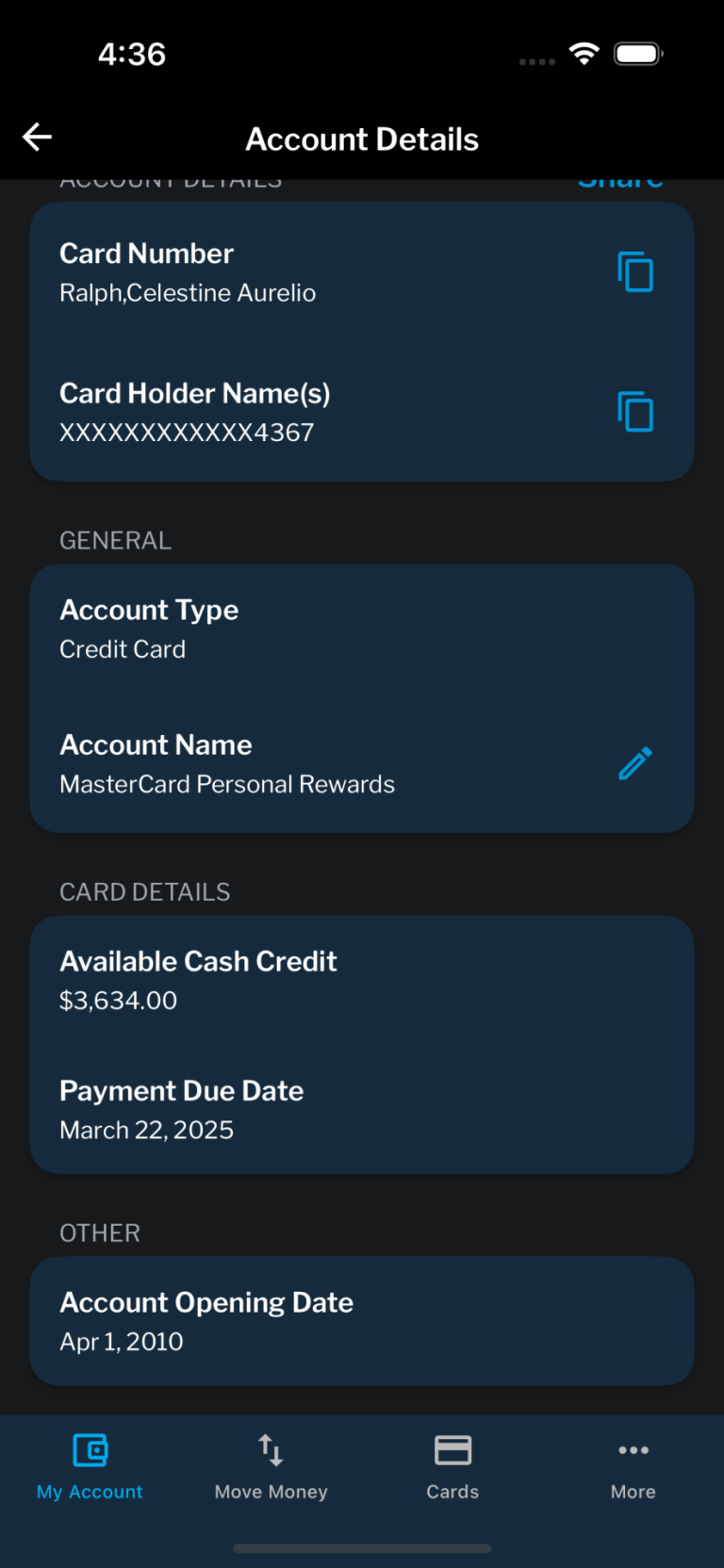
- Account Details screen redesign: Our account details screen now shows significantly more information, including term share interest rates.
Behind-the-Scenes Fixes:
- More accurate payoff amounts: We fixed an issue where the “Total Payoff Amount” displayed incorrectly on some shares.
- Skip-A-Pay safeguard (iOS): A small interface tweak now helps prevent accidental double submissions.
Time to update:
Get the latest version of the app (v2025.06.3 for iOS and v2025.06.1 for Android)—or refresh your Web experience—and enjoy a smoother, more accurate, and more rewarding way to manage your money.
June 2025 Updates
Blue Digital App Update (v2025.06 – Android)
We’ve made some thoughtful updates—both behind the scenes and on the surface—to make your Blue Digital experience even smoother, smarter, and more helpful. Here’s what’s new in the latest release:
What’s New:
- Smarter Upcoming Payments: No more “standard payment” showing up when your account balance is $0.00.
- Account Details just got an upgrade: We’ve cleaned up the layout, added better copy/paste functionality for routing and account numbers, and made interest rates visible on term shares and other accounts. It’s clearer, easier to use, and packed with the details members care about.
- Ad updates: In-app ads have been resized to look better and fit more naturally on both desktop and mobile screens.
Behind-the-Scenes Fixes:
- Improved back-end systems to accurately display term deposit interest rates.
- Fixed a labeling issue in Outbox that had the wrong name showing.
Time to update:
Get the latest version of the app (v2025.06) today and enjoy a more intuitive, member-first experience—because managing your money should feel effortless.
May 2025 Updates
- How-to Guides Now in the “More” Menu: Need quick answers? You’ll now find a direct link to our Blue Digital How-to Guides in the More section of your mobile app. It’s an easy way to access solutions to the most commonly asked questions—right at your fingertips.
View Screenshots
- Improved “Forgot Passcode” Experience: Locked out? No problem. We’ve enhanced the Forgot Passcode process to be more reliable and user-friendly—so resetting your passcode is faster, simpler, and stress-free.
April 2025 Updates
iOS & Android App Update (Version 1.0.43)
We’ve made a few behind-the-scenes improvements to make managing your money even smoother.
Here’s what’s new:
- External Transfers Message Improvement: That pesky error message when moving money from an external account? Fixed. You’ll now see accurate messages if there are insufficient funds.
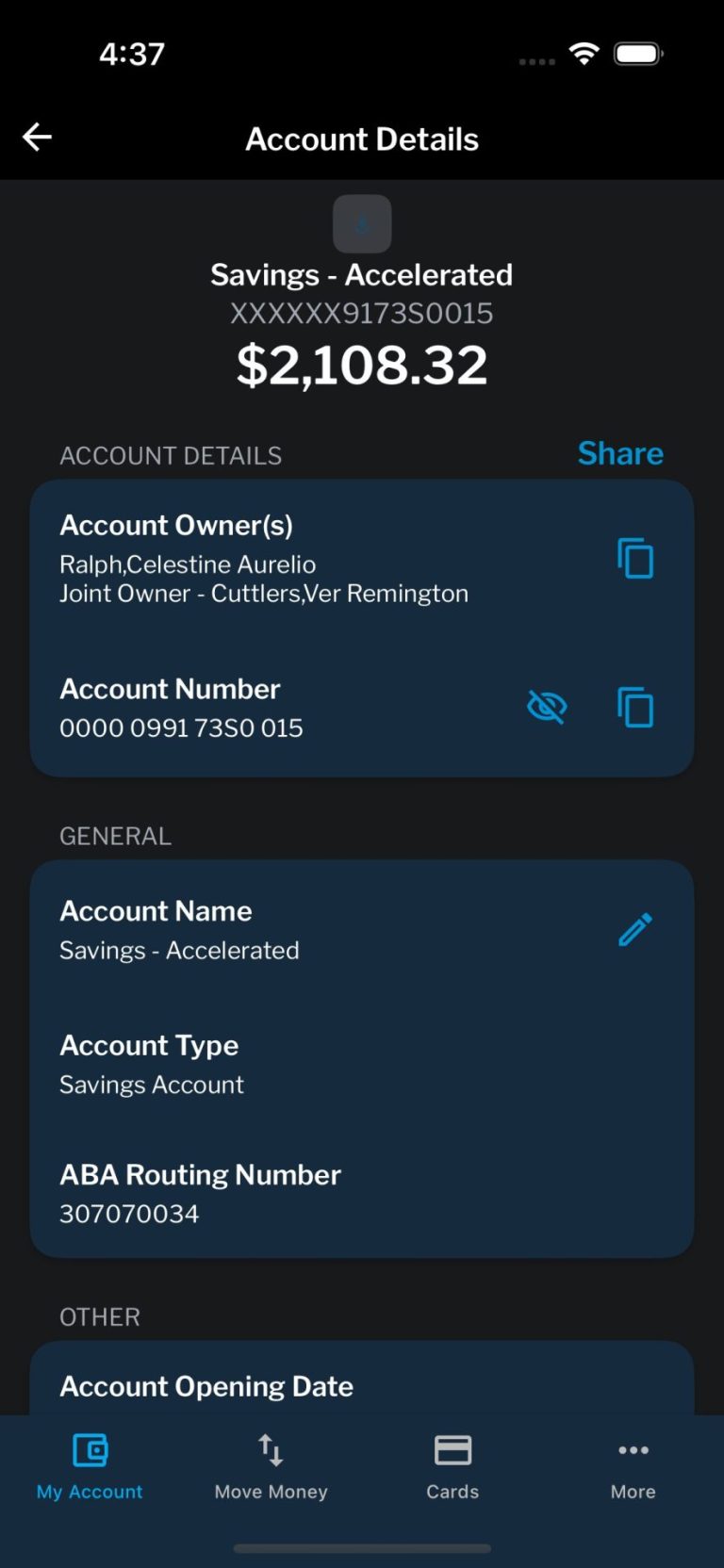
- Better Account Details View: We’ve reorganized the “Account Details” screen and added helpful updates. Your routing and account numbers are now easier to find—perfect for when you’re linking up with external accounts.
- More Accounts, More Access: You can now view up to 300 eligible accounts when transferring funds—increased from 50. That’s more flexibility, just the way you need it.
- ADA-Compliant Brand Screens: We’ve updated our splash screen to meet ADA accessibility standards—same Blue experience, even more inclusive.
Android App Only Update (Version 1.0.44)
- Enhanced eStatements Access: Members now have the ability to view and download their statements directly from the app.
- How-to Guide Accessibility: Easily access to built-in How-to Guides through a link within the mobile application.
- General Performance Improvements: Members now have a smoother and enhanced experience following key bug fixes and performance upgrades.
View Screenshots
March 2025 Updates
All Platforms
- Improved Time Zone Handling – We’ve fine-tuned how evening transfers and payments are processed. Now, anything submitted after 6 p.m. MST will go through just as expected—no extra steps, just dependable performance.
What’s New for iOS
- This update ensures a seamless experience across platforms, plus some exciting upgrades:
- Smarter Account Views – See both your Credit Limit and Available Balance right on the My Accounts page.
- Clearer Transfers – Improved messaging to make external transfers more transparent.
- View Your Account Number – Now you can choose to display your account number on the Account Details page. (Excludes credit and debit card numbers.)
- Credit Card Payment Reminders – Your next credit card payment due date is now front and center.
- Minimum Payment – Great news—our latest update, Version 1.0.41, brings a smoother, more flexible experience your way. We’ve fixed the issue with making more than the minimum payment in the iOS app, so now you can pay exactly how you want, with ease.
View Screenshots
What’s New for Android
- We’ve made some key improvements to enhance usability:
- Clearer Transfers – Better messaging for external transfers to avoid confusion.
- Streamlined Logout Process – A refined layout for easier navigation.
- Enhanced Login Experience – The Self-Enroll/Login screen is back, now with custom pre-login notifications.
View Screenshots
February 2025 Updates
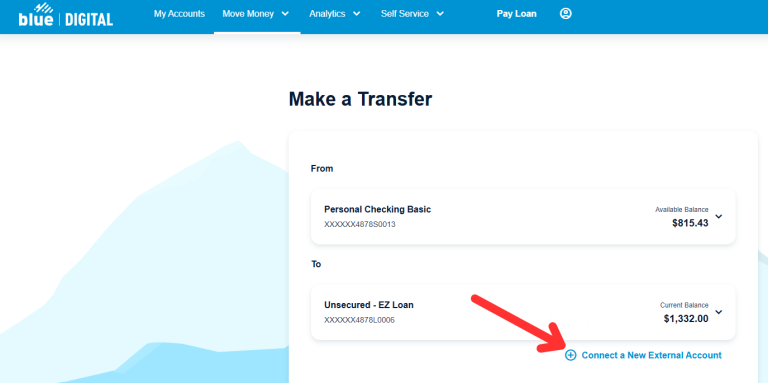
- Making Loan Payments Just Got Easier: We’ve introduced new payment buttons and links to set up external transfers to other financial institutions—making it even simpler to manage and pay your Blue loans directly through Blue Digital.
- To learn more, visit our Blue Digital How-to Guide:
View Screenshots
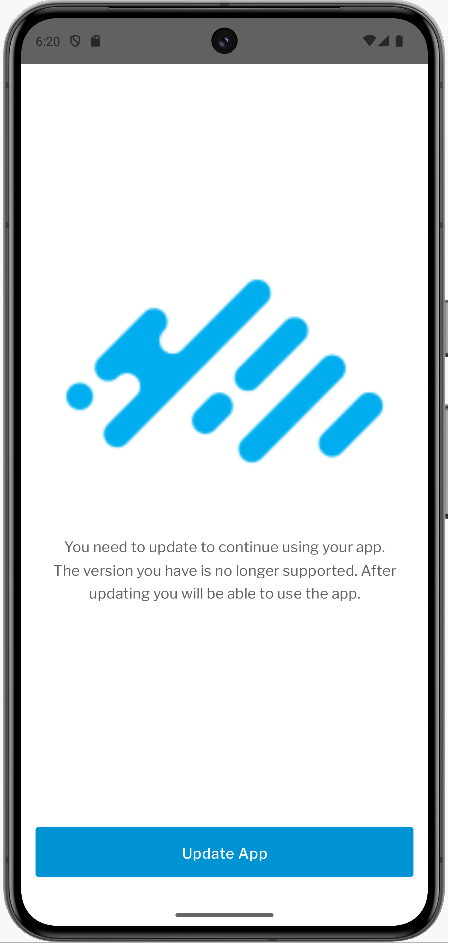
- Stay Up to Date: We’re making it easier than ever to keep your Blue Digital experience smooth and secure! Our new update alerts will notify you right on your mobile device when it’s time to update your app—whether it’s required for continued access or simply recommended to enjoy the latest features and enhancements.
View Screenshots
January 2025 Updates
At Blue, we’re committed to delivering an exceptional digital experience. This month, we’re excited to introduce new features, helpful enhancements, and behind-the-scenes improvements to make managing your finances simpler and more seamless.
Keep Your App Updated
Ensure you’re using the latest version of our app to access all the newest features and enhancements:
- iOS: 1.0.20
- Android: 1.0.20
Explore the latest updates below:
- New Features and Enhancements
- Aggregate Balances (Web)
- See Your Financial Picture More Clearly – We know how important it is to see all your finances at a glance. With our new aggregate balances feature, you can now get a full picture of your financial accounts on the web platform. Mobile users don’t worry—it’s coming your way later this year!
- Additional Account Holders Displayed (All Platforms)
- Stay Informed About Your Shared Accounts – If you share an account, you’ll now see the names of additional account holders right in the account details. This added clarity ensures you always know who’s connected to your accounts.
- Secure Message Attachments
- Simpler Tools for Better Communication – Have a document or file you need to share with us securely? You can now attach a broader range of file types—up to 25MB—to your secure messages, making it easier to send what we need to assist you.
- Accepted formats: txt, csv, jpeg, jpg, png, pdf, doc, docx, xls, xlsx
- Simpler Tools for Better Communication – Have a document or file you need to share with us securely? You can now attach a broader range of file types—up to 25MB—to your secure messages, making it easier to send what we need to assist you.
- Improved Account Number Formatting
- We’ve made account numbers easier to read and reference, helping you find the information you need faster.
- Always Stay in the Loop
- We’ve upgraded how we communicate important updates, so you’ll see clearer, more timely messages about:
- Maintenance windows
- Fraud alerts
- New product launches
- We’ve upgraded how we communicate important updates, so you’ll see clearer, more timely messages about:
These updates ensure you’re never left wondering about your accounts or services.
December 2024 Updates
Plaid Connectivity is Here: We’re excited to announce that Plaid connectivity is now live in Blue Digital! It’s all about making your financial journey smoother, smarter, and more connected. No more jumping between platforms—Plaid integration keeps your accounts in sync so you can manage your money with confidence.
November 2024 Updates
- Improved External Account Visibility: We’ve made it easier for you to view your external accounts, ensuring members can complete external account transfers with ease.
- Clearer Transaction and Product Information: We’ve resolved an issue where some members saw incorrect Transaction and Product details, so members can now enjoy a more accurate view of their accounts.
- Smoother Enrollment and Registration: We’ve improved the enrollment and registration process by addressing an issue that led some members to experience problems, making it easier to get started.
- Android App Stability Improvement: We’ve enhanced the stability of the Android mobile app! An issue that caused the app to crash when members attempted to pay loans from the loan transactions screen has been resolved. Now, you can pay your loans seamlessly without any interruptions. At Blue, we’re always working to make your mobile experience smoother and more reliable.
October 2024 Updates
Mobile App Updates:
- Link Your Accounts, Your Way: Managing your money across multiple institutions is now easier than ever. With a simple deposit verification process, you can securely connect accounts at other financial institutions right from your Blue Digital app.
Deposit Verification Screenshots
- Stay Logged In With Confidence: We’ve added safeguards to prevent accidental log-offs, so you can keep banking without interruptions.
- Simpler Troubleshooting When You Need It: The app now displays its version number, helping you (and us!) resolve any issues faster.
Version Number Locations on Mobile
- Smoother Experience, Every Time: We’ve fine-tuned visuals and eliminated some bugs to make your app feel better than ever.
- Focused Improvements for Android Users:
- Enjoy a faster app with the removal of the persistent Zelle® loading spinner.
- Simplified navigation by removing the Card feature from the menu bar.
Desktop Website Updates:
- Your Money, One Place: You can now connect external accounts through an easy deposit verification process, giving you more control and visibility over your finances—all in one spot.
Deposit Verification Screenshots
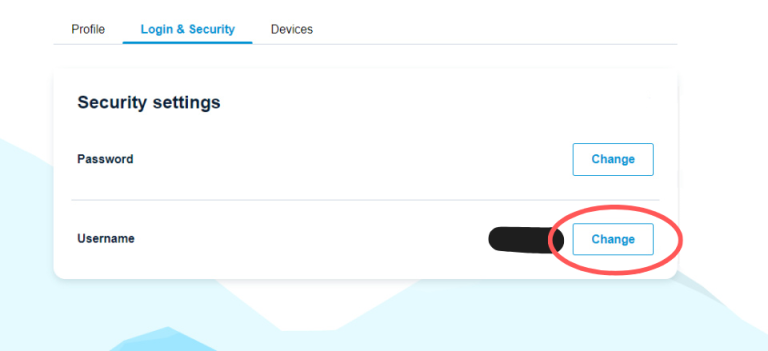
- Update Your Username Anytime, Anywhere: We’ve put the power in your hands. Need to change your username? You can now do it right from your online account.
Change Username Screenshots
- No More Duplicate Submissions: We’ve added double-click prevention in the signing flow, so you’ll avoid the hassle of accidental duplicate submissions.
- Improved for You: We’ve polished the visuals and fixed bugs to ensure a seamless experience every time you log in.
At Blue, we’re always looking for ways to make managing your finances simple, secure, and stress-free. These updates are just one more way we’re here for you—every step of your financial journey.